Sales Report
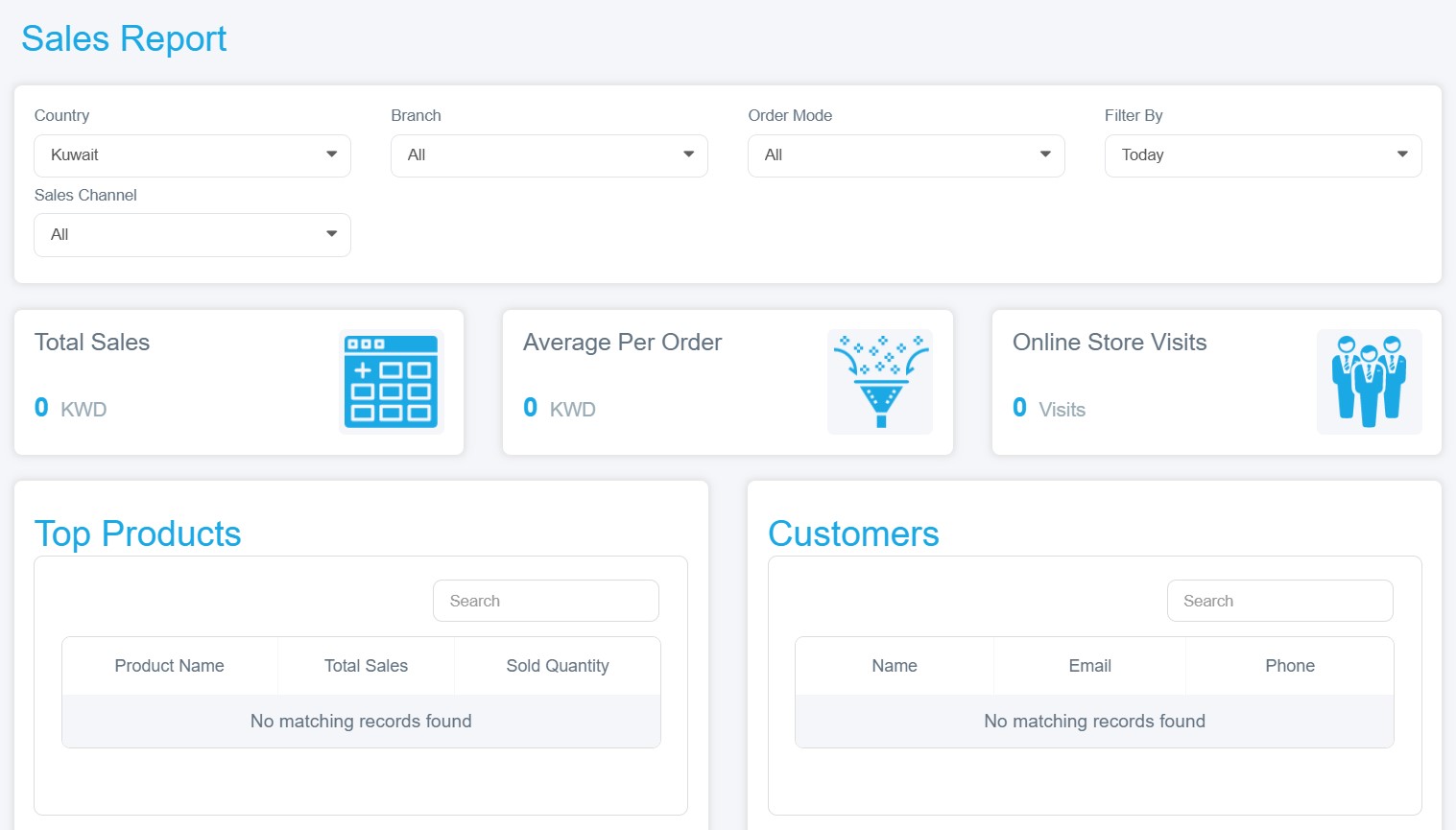
Organized data presenting information about the sales performance of your business or online store. Its purpose is to analyze business activity, understand financial results, and make informed decisions. It can be accessed by following these steps:
1. Log in to your store dashboard on Mnasati.
2. From the main menu, select "Reports".
3. A dropdown menu will appear; select "Sales Reports" from it to view detailed sales performance data. It includes:
· Filter Tools: Located at the top, these help you quickly and clearly view only the data that matters to you. You can filter by:
§ Branch: All branches or a specific branch
§ Order Mode: Delivery or pickup
§ Filter by: The period during which the orders were placed
§ Sales Channel: Online store or point-of-sale
Key Metrics
§ Total Sales: Shows the total value of all your sales
§ Average Per Order: Displays the average value of each order (Total Sales ÷ Number of Orders)
§ Online Store Visits: Number of visitors who entered your store
Detailed Tables
§ Top Products Table: Includes product name, total sales, and quantity sold
§ Customers Table: Displays customer information such as name, email, and phone number